Is Your Business Too Small for Digital Transformation? Where to Start
On this page
No. A small business can benefit from digital transformation without an enterprise software stack or an attempt to automate the whole company at once.
For a five-person business, digital transformation might mean moving scattered internal communication into Microsoft Teams or Slack, replacing a manual scheduling process, connecting two systems that employees currently update by hand, or using an AI assistant such as Claude for appropriate research and documentation tasks. For a larger organization, it may involve cross-department integrations, centralized data, automated provisioning, formal governance, and company-wide workflow automation.
The scale is different, but the underlying idea is the same: use technology to materially improve how the business operates. The goal is not to accumulate more tools. It is to remove friction from the way work gets done.
Key takeaways
Digital transformation is using technology to measurably improve how work gets done—not simply buying more software.
- Start with one costly or frustrating workflow.
- Use the smallest solution that solves the problem.
- Standardize the process before automating it.
- Measure time, errors, waits, and handoffs before and after.
Where should a small business start with digital transformation?
Start with one workflow that costs your team time or creates avoidable errors. Use this six-step plan to choose a manageable first improvement and decide whether it is worth expanding:
- Identify one bottleneck. Name a specific task, such as copying qualified website leads into the CRM and assigning a salesperson. Define where the workflow starts and ends.
- Record the baseline. Measure transaction volume, staff time, errors, waits, and manual handoffs over a representative period. Write down what improvement would make the project worthwhile.
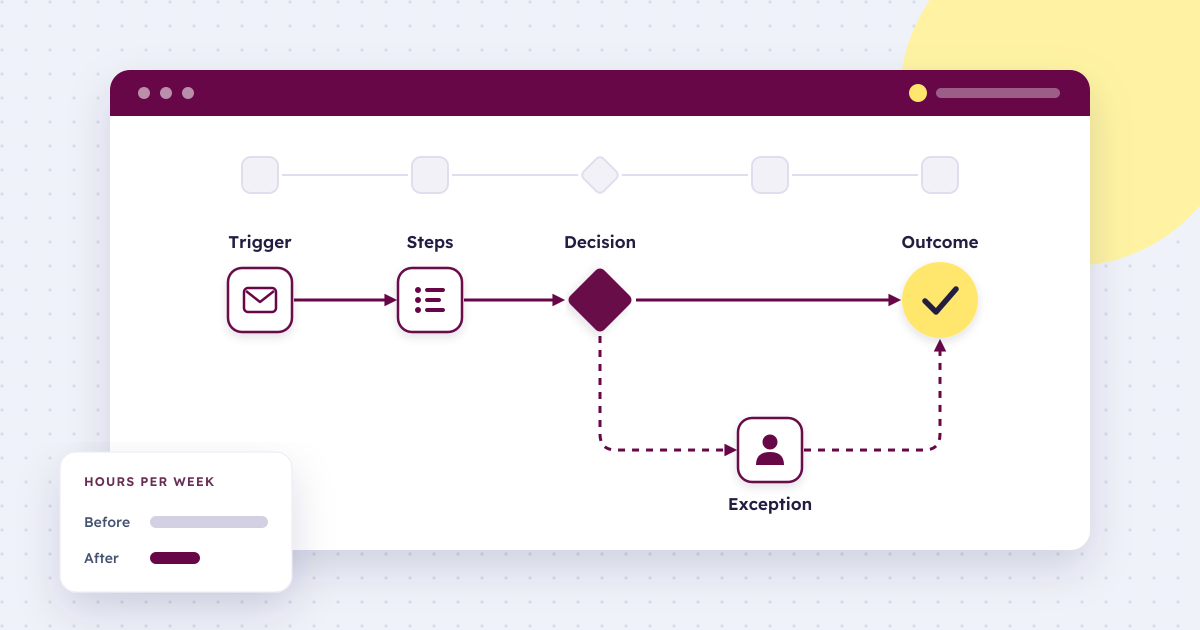
- Map the process and exceptions. Document the trigger, steps, decisions, and outcome. Agree on consistent rules and identify situations that still need human review.
- Assign an owner. Decide who approves changes, checks failures, maintains access permissions, and keeps the documentation current. Define a manual fallback before launch.
- Run a small pilot. Choose the smallest appropriate solution and test it on a limited set of work. Check both the expected path and exceptions before expanding access or volume.
- Measure and decide. Compare the same outcomes over a comparable period, accounting for changes in volume and time spent reviewing or maintaining the automation. Expand, adjust, or stop based on the results.
Those individual improvements can grow into connected systems as the business grows. You do not need an enterprise software stack to complete the first useful project.
Can a small business really benefit from digital transformation?
Yes, and small businesses are not as far behind as many owners assume. In Statistics Canada’s second-quarter 2026 Canadian Survey on Business Conditions, 19.9% of businesses with 1 to 4 employees reported using AI to produce goods or deliver services over the previous year. That is slightly above the 19.2% average across all businesses and not far behind the 27.8% reported by businesses with 100 or more employees.
U.S. survey results also show AI use among the smallest firms. In the U.S. Census Bureau’s Business Trends and Outlook Survey, fewer than 20% of firms with four or fewer employees reported using AI as of May 3, 2026, compared with 32% of firms with 100 to 249 employees and 37% of firms with at least 250 employees.
These surveys are not directly comparable. Statistics Canada asked about AI use to produce goods or deliver services over the preceding 12 months. The U.S. survey asked about AI use in any business function over the preceding two weeks. Both document adoption among small businesses, but the different definitions and reporting periods limit comparisons between countries. AI adoption alone also does not establish that a business has improved its performance.
Smaller organizations may even have an advantage. In McKinsey’s 2018 global survey on digital transformations, only 16% of respondents said their transformation both improved performance and sustained the gains. But respondents at organizations with fewer than 100 employees were 2.7 times more likely to report success than those at organizations with more than 50,000 employees.
Team size matters less than the work itself. A 10-person company processing hundreds of repetitive transactions every week may have a stronger case for automation than a 50-person company whose work changes from project to project.
So the question is not “Are we big enough?” It is “Where is technology worth changing the way we work?”
Why isn’t buying software the same as digital transformation?
Because buying software gives you a capability, not a working process. Modern SaaS tools make powerful capabilities available to businesses of almost any size, but purchasing the tool is usually the easy part. Someone still needs to decide how it fits into the business.
Consider a company that receives leads through its website and wants those leads assigned to the right salesperson automatically. The software may already exist, but someone still has to determine:
- which leads should enter the workflow;
- where the information should be stored;
- how leads should be assigned;
- what happens when information is missing;
- who should be notified;
- what permissions the automation needs;
- how failures will be detected; and
- who will maintain the workflow when one of the connected systems changes.
This is the difference between having access to automation software and having a reliable automated process.
The survey data reflects this. Among Canadian businesses that used AI in the past year, 44.4% changed their training or staffing practices because of it, according to Statistics Canada. Adopting technology changes how people work, not just what the company subscribes to.
For many owners and operations leaders, learning to build and maintain these systems is not the best use of their time. What is missing is not another SaaS subscription. It is implementation.
How many employees do you need before buying enterprise software?
There is no universal employee count at which a business suddenly needs an enterprise platform. Transaction volume, process complexity, the number of systems involved, the cost of errors, and the maintenance burden all matter as much as headcount.
A small team working from a CRM, accounting platform, spreadsheets, and email can reach the point where those systems create more work than they save. Employees enter the same information in multiple places. Someone exports a CSV every Friday because two systems do not communicate. Nobody is sure which system holds the current version of a record.
At that point, integration or consolidation may be worth the investment even with relatively few employees. The opposite is also true: a larger team with straightforward, stable processes may not need an enterprise suite at all.
Instead of using headcount as the deciding factor, look at five things:
- Volume: How often does the task happen?
- Stability: Does the process follow the same steps most of the time?
- Integration complexity: How many systems need to exchange information?
- Cost of errors: What happens when someone misses a step or enters something incorrectly?
- Maintenance: How much time is spent keeping the current setup working?
The more pressure you see across these areas, the stronger the case for improving the underlying systems.
What should you fix first: the tool, the integration, or the process?
Choose the smallest intervention that solves the actual problem. Sometimes that is a better tool. Sometimes two existing tools need to communicate. Sometimes a repetitive workflow should be automated. And sometimes the process itself needs fixing before technology is introduced at all.
| If the problem looks like this | A reasonable starting point |
|---|---|
| Internal communication is scattered across email and text messages | Evaluate a collaboration tool such as Slack or Microsoft Teams |
| Remote meetings or client access create unnecessary friction | Use a meeting platform such as Zoom |
| Employees spend time on repetitive research, summaries, or first drafts | Evaluate an AI assistant such as Claude for appropriate tasks |
| Staff repeatedly copy the same information between systems | Integrate the systems, natively or through a tool such as Zapier, Make, or Microsoft Power Automate |
| One stable process consumes hours every week | Evaluate workflow automation |
| Several systems contain conflicting versions of the same information | Consolidate or synchronize the data |
| Employees perform the same process differently | Standardize the process and create an SOP first |
| Existing automations constantly break | Review the architecture and maintenance burden before adding more |
This prevents a common mistake: choosing technology first and looking for a problem to justify it afterward.
When is a simple script better than an automation platform?
For a narrow, repetitive task, a lightweight script or small internal tool can be more practical than a platform with dozens of features the team will never use. A script might be enough to generate a recurring report, move information between two systems, clean a predictable data file, or eliminate repetitive data entry.
Between custom code and enterprise suites sit workflow automation platforms. Zapier and Make are popular no-code options for connecting SaaS applications. Microsoft Power Automate is a natural fit for businesses already working in Microsoft 365. n8n can be self-hosted, which gives teams more control over where their data flows. Any of these can be a sensible middle ground, as long as someone owns what gets built and has a plan for ongoing support.
The math changes when the automation becomes a system of its own. If one script becomes six scripts, several APIs, multiple user roles, and a collection of undocumented exceptions, the apparent savings can disappear. That is why the cost comparison needs to go beyond license fees:
Total cost = software + implementation + maintenance + staff time + cost of errors
A low-cost SaaS subscription is not inexpensive if employees spend hours every week working around it. A custom script is not inexpensive if only one person knows how to fix it. And an automation that saves five hours per week is less valuable if someone has to spend three hours every month repairing it.
The right solution is the one that reduces the total cost and friction of completing the work, not necessarily the one with the lowest monthly bill.
What are the security and privacy risks of automating too quickly?
The main risk is access. An automation usually runs with the same permissions as the people it replaces, so moving quickly can hand broad, permanent access to systems nobody is watching. Automation often needs to reach email, customer records, accounting software, shared drives, CRMs, and internal databases. That makes permissions important from the beginning.
In smaller teams, the common problem is convenience. Someone gives an automation broad access to make it work. A shared credential gets used because it is faster. A test integration becomes permanent. Six months later, nobody remembers exactly what the automation can access or which workflows depend on that account.
Before scaling automation, define who owns each workflow, what information it can access, where credentials are stored, and how the team will monitor and respond when a workflow fails.
These concerns are common. Cybersecurity or privacy concerns were the most frequently reported barrier limiting AI use among Canadian businesses in 2026, cited by 13.4% of businesses, ahead of cost at 10.6% (Statistics Canada).
Templates and no-code tools can make implementation easier, but they do not remove this responsibility. A pre-built automation with excessive permissions is still an automation with excessive permissions.
Privacy law then sets a floor for what you have to protect, and that floor differs by country.
In Canada
For Canadian businesses handling personal information, the applicable privacy law depends on where and how you operate. According to the Office of the Privacy Commissioner of Canada (OPC):
- PIPEDA, the federal private-sector privacy law, generally applies to commercial activity in provinces without their own comparable law, and to personal information that crosses provincial or national borders.
- Alberta’s Personal Information Protection Act (PIPA), British Columbia’s PIPA, and Quebec’s Act respecting the protection of personal information in the private sector (significantly updated by Law 25) have been deemed substantially similar to PIPEDA, so organizations subject to them are generally exempt from PIPEDA for activity within those provinces.
PIPEDA’s safeguards principle requires protection that matches the sensitivity of the information and expects organizations to keep safeguards current as risks change. The OPC’s examples, including limiting access, using passwords and encryption, and training staff, apply directly to automation accounts and credentials.
The rules are also changing. In June 2026, the federal government introduced Bill C-36, which would replace PIPEDA’s privacy provisions with a new Protecting Privacy and Consumer Data Act. The bill was still before Parliament at the time of writing, so check its status before planning around either regime.
In the United States
There is no single federal privacy law covering most private-sector businesses. Obligations come instead from state law and from sector-specific rules, and both can apply to the same automation.
- State privacy laws. Twenty states had comprehensive consumer privacy laws on the books as of early 2026, according to MultiState, and further states have passed laws since, so check the current list rather than a fixed number. Whether one applies usually depends on how much personal information you handle rather than how large your team is. For California’s CCPA, a for-profit entity doing business in California that collects consumers’ personal information and determines how and why it is processed generally qualifies as a business if it meets at least one threshold: gross revenue above $26,625,000 in the previous calendar year; annually buying, selling, or sharing personal information about at least 100,000 consumers or households; or earning at least half its annual revenue from selling or sharing consumers’ personal information. Exemptions and other coverage rules can also apply (California Privacy Protection Agency’s business guidance). The revenue threshold took effect on January 1, 2025, and is subject to adjustment every two years (CPPA threshold update).
- Sector rules. The FTC Safeguards Rule requires non-bank financial institutions, a category that includes tax preparation firms, mortgage brokers, collection agencies, and financial advisors, to maintain a written information security program. It applies regardless of company size, although institutions that maintain customer information on fewer than 5,000 consumers are exempt from some of its provisions.
The practical conclusion is the same in both countries. Know which records each automation can reach, and keep that access proportionate to how sensitive the information is.
This section is general information, not legal advice.
Should you standardize a process before automating it?
Usually, yes. Automation is good at repeating a defined process. It is much less useful when nobody agrees on what that process is. If three employees complete the same task in three different ways, automating one version may simply make an inconsistent process run faster.
That is why SOPs matter, even though writing one may not feel particularly transformative. Before building an automation, map the workflow:
Trigger → steps → decisions → exceptions → outcome
Then ask where people regularly deviate from it and why. Some exceptions are unnecessary habits that can be removed. Others are legitimate business rules the automation needs to accommodate. Doing this work first shows what should be automated and what still requires human judgment.
We saw this in our work with Autozen, a fast-growing vehicle marketplace. Its seller journey had become a complex multi-step process that felt operational rather than guided, with complex information requests introduced too soon and limited visibility across the selling process. The seller workflow was rebuilt around clearer expectations and stronger milestone visibility, so sellers could understand exactly where they were in the process and what came next. The redesign won Best Retail Experience at the 2023 Vancouver UX Awards. Read the Autozen case study →
How long does it take to digitally transform one department?
There is no reliable timeline based on department size alone. A well-understood workflow connecting two systems could be improved in weeks. A seemingly simple process involving sensitive information, legacy software, multiple approvals, and dozens of exceptions can take much longer.
That is another reason to avoid starting with a goal such as “transform the company.” Start with a bounded problem instead.
Too broad: Automate sales.
Better: Automatically capture qualified website leads in the CRM, assign an owner, and notify the sales team.
The second project has a defined trigger, workflow, and outcome. It can be tested, measured, and improved without redesigning the entire sales operation. Once it works reliably, the next bottleneck becomes easier to identify.
Who maintains an automation after it is built?
Someone has to, and naming that owner belongs in the build rather than after it. This is one of the most overlooked questions in automation planning. Automations are software, and software rarely exists in a static environment.
An API changes. A SaaS provider modifies a field. An employee leaves. A new approval step is introduced. The company changes its CRM. A workflow that originally handled 50 transactions per month now handles 2,000. Someone needs to notice when things stop working and understand how to fix them.
That does not mean a small business needs to hire a full-time developer or build an internal automation department. An external automation partner can fill that role, from designing and documenting the workflow to maintaining it as the business changes.
Larger organizations already work this way. Among Canadian businesses with 100 or more employees that used AI in the past year, 30.2% brought in external consultants or vendors, compared with 10.7% of businesses with 1 to 4 employees (Statistics Canada). Smaller businesses can access the same kind of expertise without building an internal team first.
How do you decide what to automate first?
The best first automation is usually not the most impressive one. It is the workflow where a relatively small improvement produces a visible operational result. Look for work that is:
- performed frequently;
- reasonably predictable;
- time-consuming;
- prone to manual errors;
- dependent on moving information between systems; or
- slowing down another part of the business.
Then establish what happens today. How many hours does it take? How frequently do errors occur? How long does the customer or employee wait? How many manual handoffs are involved? Those numbers give you a baseline.
After implementation, measure the same process again. That turns digital transformation from an abstract technology initiative into an operational question: Did the business get better at doing the work?
Hypothetical example: measuring time saved on lead entry
The following numbers are invented to illustrate the calculation. They are not Autozen or UX Soda client results, a forecast, or a benchmark.
Suppose a team handles 60 qualified leads in a representative week. Before automation, entering and assigning each lead takes five minutes. During a pilot with the same volume, staff spend one minute reviewing each lead and another 30 minutes that week monitoring and maintaining the workflow.
| Weekly staff time in this hypothetical example | Before automation | During the pilot |
|---|---|---|
| Entry, assignment, or review for 60 leads | 300 minutes | 60 minutes |
| Additional automation monitoring and maintenance | 0 minutes | 30 minutes |
| Total for the measured work | 300 minutes | 90 minutes |
Illustrative net time saved: 300 − 90 = 210 minutes, or 3.5 staff hours per week. This calculation excludes initial implementation and training time, software fees, and any additional rework; include those when assessing total cost. Track error rates and time to assignment separately so that faster processing does not hide a decline in quality. Repeat the measurement over comparable periods before deciding whether the improvement lasts.
Why work with UX Soda as your automation partner?
At UX Soda, we do not view automation as connecting two applications and walking away. That can mean finding where time is being lost in an existing workflow, documenting an inconsistent process before automating it, integrating software you already use instead of adding another platform, or building a lightweight internal tool when off-the-shelf products do not solve the problem cleanly.
The objective is not to automate as much as possible. It is to determine what is worth automating, how it should work, and how it will continue working after launch. We can stay involved to maintain and refine those systems as your people, applications, and business rules change, so you are never left with an automation nobody knows how to support.
If you have repetitive processes that should be easier but lack the time or technical resources to design and maintain the automation yourself, UX Soda can act as your automation partner, from identifying the opportunity and implementing the workflow to maintaining and improving it after launch. Talk to UX Soda about your workflows →
Sources
- Statistics Canada. “Analysis on artificial intelligence use by businesses in Canada, second quarter of 2026.” Analysis in Brief, catalogue no. 11-621-M, June 11, 2026.
- McKinsey & Company. “Unlocking success in digital transformations.” McKinsey Global Survey, 2018.
- Office of the Privacy Commissioner of Canada. “PIPEDA requirements in brief.”
- Office of the Privacy Commissioner of Canada. “PIPEDA Fair Information Principle 7 – Safeguards.”
- Gowling WLG. “Understanding Bill C-36: What organizations need to know about Canada’s proposed privacy reform bill.” 2026.
- U.S. Census Bureau. “Large Firms With at Least 20 Employees Biggest AI Users.” Business Trends and Outlook Survey, data as of May 3, 2026.
- MultiState. “20 State Privacy Laws in Effect in 2026: Key Dates and Changes.” February 4, 2026.
- California Privacy Protection Agency. “Does My Business Need To Comply With The CCPA?”
- Federal Trade Commission. “FTC Safeguards Rule: What Your Business Needs to Know.”
- California Privacy Protection Agency. “California Privacy Protection Agency Announces 2025 Increases for CCPA Fines and Penalties.” December 17, 2024; thresholds effective January 1, 2025.
Frequently asked questions about digital transformation for small business
Can a small business really benefit from digital transformation?
Yes. Digital transformation can be a small operational improvement, such as replacing a manual scheduling process, connecting two systems that employees update by hand, or using an appropriate AI assistant for research and documentation. The aim is to remove friction from work, not to buy an enterprise software stack.
How many employees do you need before buying enterprise software?
There is no universal employee threshold. Transaction volume, process complexity, the systems involved, the cost of errors, and maintenance effort are better indicators. A small team with high-volume, repetitive work may benefit from integration or consolidation, while a larger team with stable, straightforward work may not need an enterprise suite.
Should you standardize a process before automating it?
Usually, yes. Automation repeats a defined process well, but it can make inconsistent work happen faster. Map the trigger, steps, decisions, exceptions, and outcome first, then identify which rules are stable enough to automate and which situations still need human judgment.
How do you decide what to automate first?
Start with a frequent, predictable, time-consuming workflow that is prone to manual errors, moves information between systems, or delays another part of the business. Establish a baseline for time, errors, waits, and handoffs, then measure the same outcomes after implementation.